
TL;DR: Letting AI agents write and execute code instead of making direct MCP tool calls reduces token usage by up to 77% with no drop in task success rate. Anthropic, Cloudflare, and the open-source community are all converging on this pattern independently.
Why AI agents should write code instead of calling tools – and how the ecosystem is solving both sides of the problem at once.
There’s a quiet architectural shift happening in AI agent development, and it doesn’t have a single origin story.
In November 2025, Anthropic published an engineering post describing how AI agents could dramatically reduce token usage by writing executable code instead of making direct tool calls. A few weeks later, Cloudflare launched Code Mode, a production-ready implementation of the same idea, built into their Agents SDK. That kind of convergence is worth paying attention to.
What Is MCP and Why Does It Matter for AI Agent Architecture?
The Model Context Protocol (MCP) is an open standard introduced by Anthropic that lets AI agents connect to external tools, databases, APIs, and services through a uniform interface. Often called “USB-C for AI agents,” MCP became infrastructure by early 2026.
But as teams scaled up – more tools, more complex workflows, larger datasets – a hidden cost started surfacing. And it wasn’t about the protocol itself.
The Two Problems with Traditional MCP Tool Calling
Problem 1: Tool Definitions Consume Your Entire Context Window
When an agent starts a session, all tool definitions are loaded into the model’s context window. Each definition includes its name, description, and parameter schema – typically 300-600 tokens per tool.
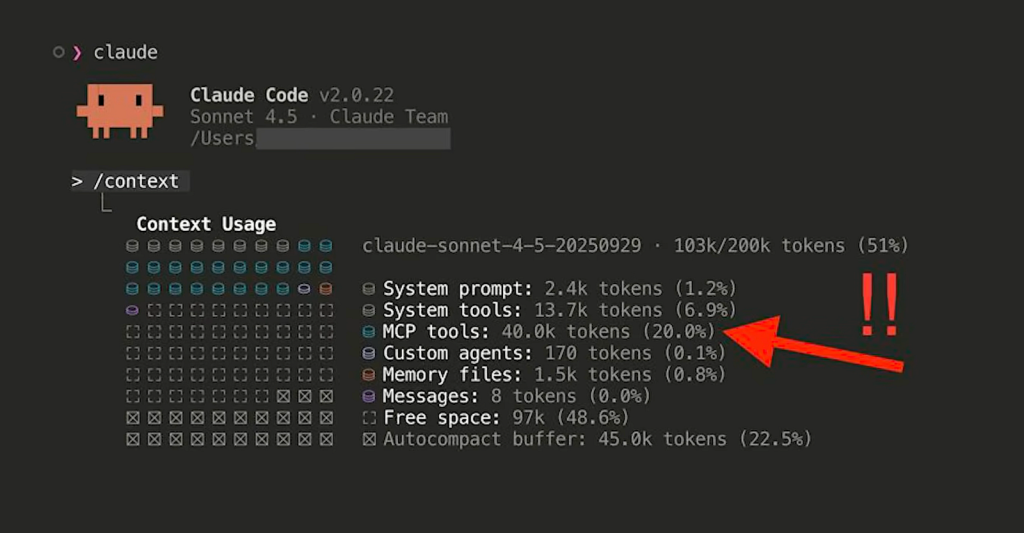
The math compounds fast:
- 20 tools: ~10,000 tokens consumed before the agent reads your first message
- 50 tools: ~25,000 tokens gone
- 50 MCP servers × 20 tools each: 150,000 tokens – just in definitions
At that scale, you’re burning most of a context window on a lookup table before the agent has done anything.
Problem 2: Intermediate Data Passes Through the Model on Every Step
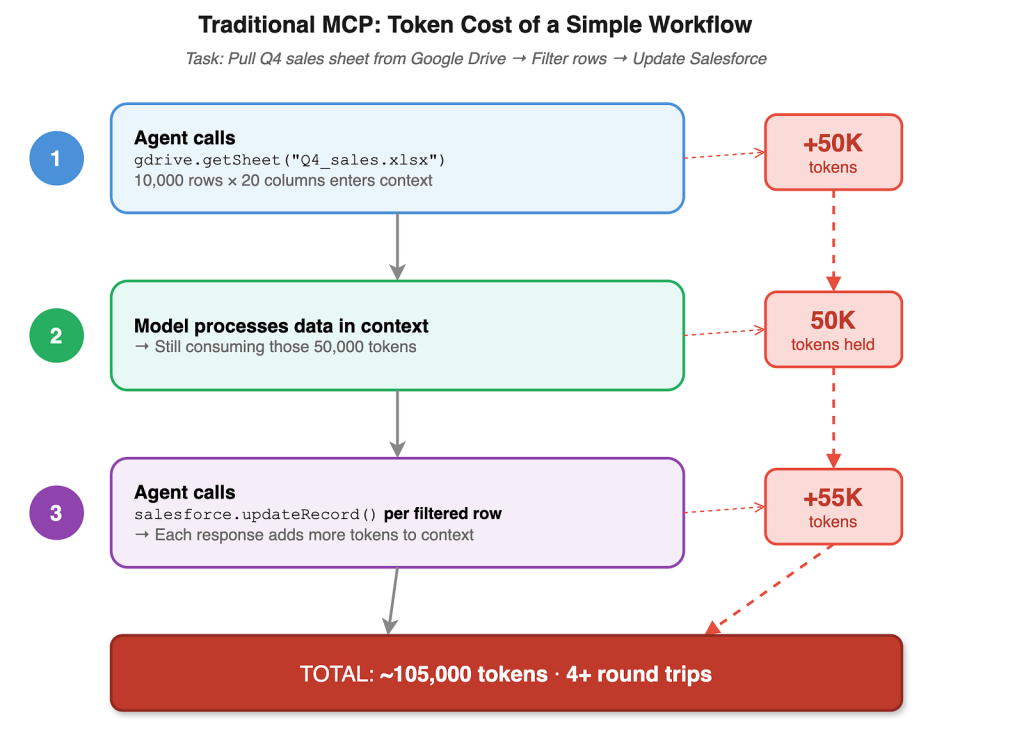
Consider a simple workflow: pull meeting notes from Google Drive, extract action items, create tasks in Asana. Without code execution:
- Agent calls gdrive.getDocument → 15,000 tokens enter the context
- Model processes and extracts action items → still in context
- Agent calls asana.createTask multiple times → each response enters context
- Result: 40,000+ tokens burned for what is fundamentally a data piping job
The model is acting as a relay – ingesting every piece of data just to pass it to the next step. Every round-trip adds latency. For agents running dozens of tool calls in a pipeline, this compounds fast.
The Fix: Let AI Agents Write and Execute Code Instead of Calling Tools Directly
The insight is almost embarrassingly simple: LLMs are extremely good at writing code. They are mediocre at calling tools.
The reason is training data. LLMs have been trained on billions of lines of real-world code. Tool calling, by contrast, relies on a relatively small set of synthetic examples constructed specifically for that purpose.
The fix is to stop presenting tools as tools and start presenting them as code.

Instead of exposing 50 MCP tools to the agent’s context, you:
- Convert the MCP tool schemas into a TypeScript (or Python) interface definition
- Give the agent a single “execute code” tool
- The agent writes TypeScript that calls the API; a sandboxed runtime executes it
- Only the final output of the code returns to the model’s context
The intermediate data, the spreadsheet, the document, the API response, never flows through the model at all. It lives in the execution environment, gets processed by code, and the model sees only what it explicitly asked the code to return.
How MCP code execution works:
- Convert MCP tool schemas into a TypeScript (or Python) interface definition
- Give the agent a single “execute code” tool
- The agent writes TypeScript that calls the API; a sandboxed runtime executes it
- Only the final output returns to the model’s context
Code execution approach: the agent writes this instead:
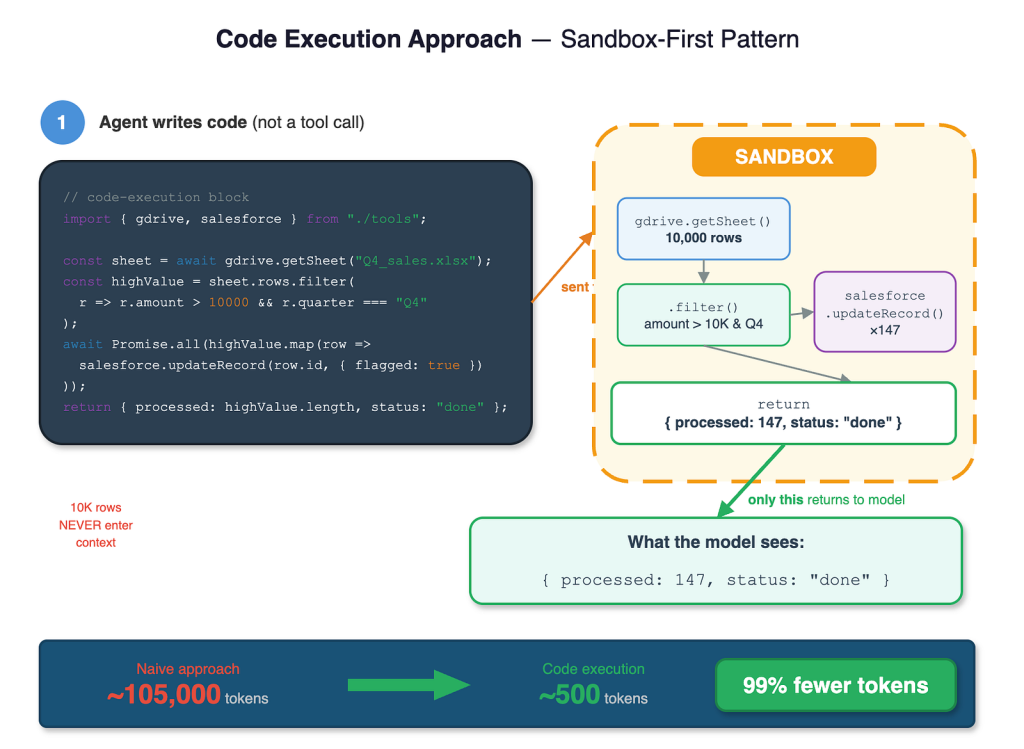
That’s a 99%+ reduction for this workflow. The agent also handles the filtering, parallel API calls, and error handling entirely in code, no round-trips needed.
AIMultiple ran an independent benchmark, 50 runs per approach, GPT-4.1, identical tasks:
Intermediate data – the spreadsheet, the document, the API response – never flows through the model. It lives in the execution environment, gets processed by code, and the model sees only what it explicitly asked the code to return.
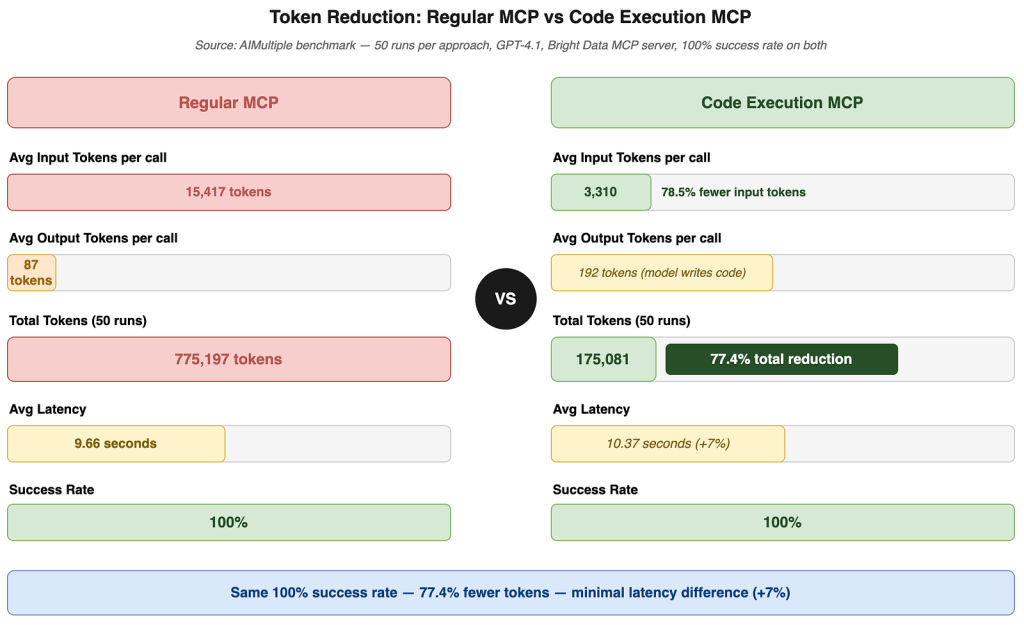
77.4% total token reduction. Same success rate. +7% latency, easily offset by the cost savings at any meaningful usage volume.
MCP Code Execution vs. Direct Tool Calling: Benchmark Results
AIMuliple ran an independent benchmark – 50 runs per approach, GPT-4.1, identical tasks:
| Metric | Direct Tool Calling | Code Execution |
|---|---|---|
| Token usage | Baseline | −77.4% |
| Task success rate | Same | Same |
| Latency | Baseline | +7% |
Anthropic’s internal evals show MCP tool-use accuracy improving from 49% to 74% on Opus 4, and from 79.5% to 88.1% on Opus 4.5, with programmatic calling enabled.
Which Tools and Platforms Already Support MCP Code Execution?
The pattern is not one company’s idea. Here’s who’s already shipping it:
Anthropic published the foundational pattern and ships it natively as Programmatic Tool Calling and a companion Tool Search Tool – managed API features that handle sandboxing and orchestration without leaving implementation as an exercise for the reader.
Cloudflare Code Mode auto-converts MCP schemas into TypeScript interfaces and executes them in V8 isolates via the Worker Loader API. Fresh isolates start in milliseconds – no containers, no prewarming. API keys never reach the generated code; the agent accesses MCP servers through pre-authorised bindings.
context-mode (Elastic License 2.0) approached the same problem from the opposite direction. Where Cloudflare compresses what goes in, context-mode compresses what comes out. Supports Claude Code, Gemini CLI, VS Code Copilot, Cursor, and others.
Zapcode (MIT) runs a TypeScript interpreter in Rust that starts in 2 µs (vs. 200–500 ms for Docker), supports snapshotting VM state to bytes for later resumption, and plugs directly into the Anthropic, OpenAI, and Vercel AI SDKs.
When to Use MCP Code Execution vs. Direct Tool Calling
This is not a “use code execution for everything” recommendation. The tradeoffs are real.
Use MCP code execution when:
- Your agent connects to more than 10 tools
- Workflows involve large intermediate data (documents, spreadsheets, API responses)
- You need multi-step pipelines where results feed into other calls
- Privacy matters -sensitive data should stay in the execution environment
- Token costs are a meaningful concern at your usage level
Stick with direct MCP tool calling when:
- You have a small, stable set of tools (fewer than 10)
- Queries are single-step and straightforward
- Operational simplicity matters more than token efficiency
- Your environment prohibits running arbitrary code (compliance, airgap, etc.)
One honest caveat: some MCP servers embed guiding instructions in tool responses to shape the agent’s next action. Code execution treats tools as pure APIs – those instructions get bypassed. Worth checking before switching if you’re building on a server that relies on this behavior.
What MCP Code Execution Means for AI Agent Architecture in 2026
MCP’s value was never just about making tool calls. It was about creating a uniform discovery and authorization layer for agents to access external systems. That value doesn’t disappear with code execution – it deepens. Code execution gives agents a far more expressive way to use the interfaces MCP exposes.
As more agents run in parallel, token costs compound. Code execution is shifting from optimization to necessity. Expect it to become the default MCP client pattern within the next year, with output compression becoming the default session management layer alongside it.
Frequently Asked Questions
What is MCP code execution and how does it differ from direct tool calling?
MCP code execution is an architectural pattern where AI agents write and run code (typically TypeScript or Python) to interact with external tools, rather than making direct tool calls. Unlike direct tool calling – where every tool definition and intermediate result passes through the model’s context window – code execution keeps intermediate data in a sandboxed runtime. Only the final output returns to the model, reducing token usage by up to 77% in benchmarks.
Why do AI agents waste so many tokens on tool definitions?
In traditional MCP setups, all available tool definitions are loaded into the model’s context window at the start of every session. Each definition costs 300–600 tokens. An agent with access to 50 MCP servers and 20 tools each consumes 150,000 tokens in definitions alone – before processing a single user request.
Does MCP code execution reduce task accuracy?
No. AIMuliple’s benchmark (50 runs per approach, GPT-4.1) found identical task success rates between direct tool calling and code execution, with a 77.4% token reduction in favor of code execution. Anthropic’s internal evals show accuracy improving with programmatic tool calling: from 49% to 74% on Opus 4.
How long does it take to start a code execution sandbox for MCP?
It depends on the runtime. Cloudflare’s V8 isolates start in milliseconds with no prewarming. Zapcode’s Rust-based TypeScript interpreter starts in 2 microseconds. Both are fast enough to be invisible at the request level.
Is MCP code execution production-ready?
Yes. Anthropic ships it natively as Programmatic Tool Calling on the Claude API, AWS, and Microsoft Foundry. Cloudflare Code Mode is in production beta. Zapcode and context-mode are open source and actively maintained.
When should I not use MCP code execution?
When you have fewer than 10 tools, single-step queries, or environments where running arbitrary code is prohibited (compliance, airgap constraints). Also check whether your MCP servers embed guiding instructions in tool responses – those are bypassed in code execution mode.
Where to Start with MCP Code Execution
- Cloudflare Code Mode: available now locally via Wrangler, production beta open for signup: blog.cloudflare.com/code-mode
- context-mode: output-side compression, drop-in MCP server for Claude Code and others: github.com/mksglu/context-mode
- Zapcode: open source, MIT licensed, supports Anthropic / OpenAI / Vercel AI SDK: github.com/TheUncharted/zapcode
- Anthropic’s engineering post: the original pattern write-up: anthropic.com/engineering/code-execution-with-mcp
- Anthropic Programmatic Tool Calling: native managed version on the Claude API, AWS, and Microsoft Foundry: platform.claude.com/docs/en/agents-and-tools/tool-use/programmatic-tool-calling
If you run benchmarks on your own MCP agent, share them. This is a pattern that gets stronger with more data.
Leave a Reply